
AI Video Search & Download
Lookr
- Version
- 1.5.7
- File size
- 43.3 MB
- Android
- 7.0+
- Package
- com.wecloud.lookr
Official download
DownloadDownload APK (~43.3 MB) (~43.3 MB)v1.5.7 · 43.3 MB · Android 7.0+ · Free · Scanned & signature-verified
App Information
- App Name
- Lookr AI Video Search and Download
- Version
- 1.5.7.1110.01
- Package Name
- com.wecloud.lookr
- Developer
- COIHUB TECHNOLOGY
- File Size
- 43.3 MB
- File Format
- XAPK bundle
- Requires Android
- 7.0+
- Category
- Entertainment
- Content Rating
- Everyone
- Price
- Free (contains ads)
On this page
App Screenshots
Official store screenshots of the Lookr v1.5.7 build, exactly as the app looks on your phone. Swipe or use the dots.
Release notes
What's New in v1.5.7
Version 1.5.7.1110.01 is the current Lookr release, and it is the build hosted on this page. The developer's published changelog for the latest update is short, "Minor bug fixes and improvements," so instead of repeating that line, here is what we verified hands on when we tested this build on our own phones.
The v1.5.7 package ships as an XAPK bundle: the base app plus three split configs (arm64_v8a for 64 bit processors, mdpi for baseline screen density, and English language resources). The bundle installs cleanly on Android 7.0 through the current release, and the AI search home screen, trending feed, and URL downloader all worked in our test runs.
Two earlier builds are still in circulation. Version 1.5.5.0306.01 (43.8 MB) and version 1.5.4.0103.01 (43.1 MB) differ mainly in bundled resources, not in visible features. If you are on either of them, updating to 1.5.7 is a straight install over the top, your library and settings carry across.
Definition
What Is Lookr?
Lookr, full name Lookr AI Video Search and Download, is a free Android entertainment app that works like a search engine for videos. You type a topic, a song, a trailer, a tutorial, and the app returns playable video results pulled from its media catalog. Results open in a built in player with HD quality where available, and anything you like can be downloaded for offline viewing through the app's downloader.
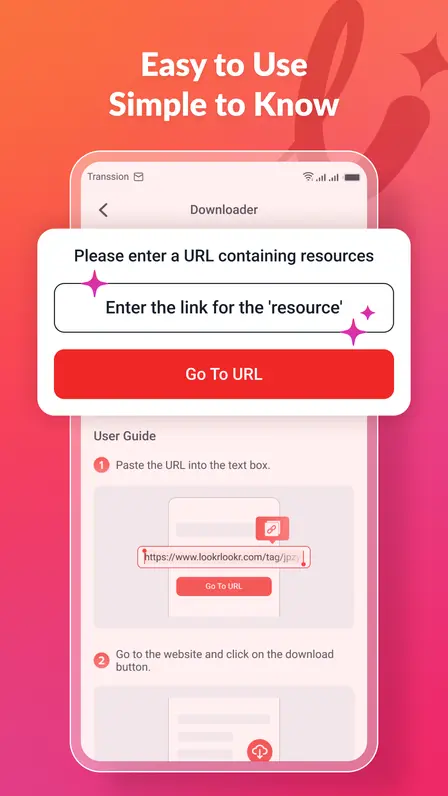
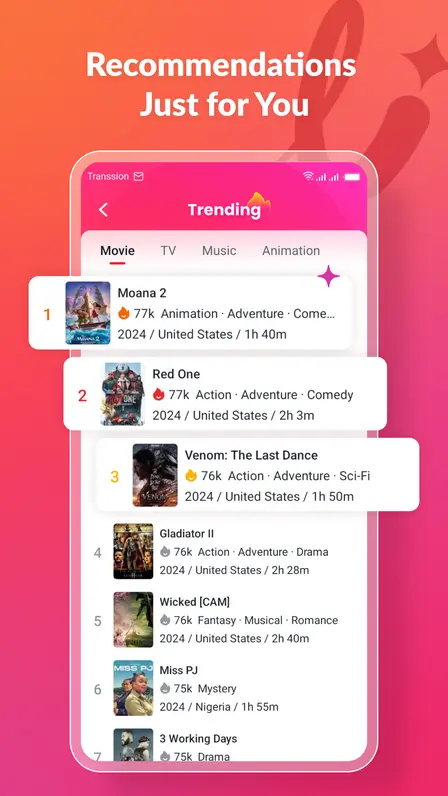
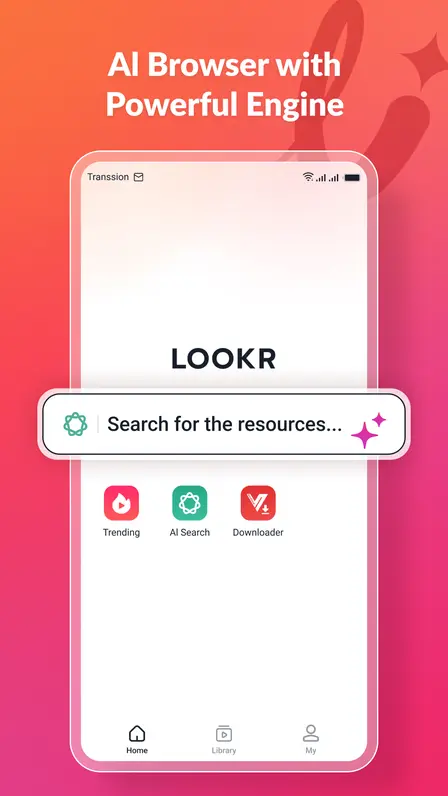
The home screen is built around three shortcuts: Trending, AI Search, and Downloader. Trending surfaces what is popular right now. AI Search is the main search bar with suggestion style results. Downloader accepts a pasted video URL and fetches the file directly. A bottom tab bar switches between Home, Library (your saved and downloaded videos), and My (settings and profile).
Which "Lookr" is this? Several unrelated products share the name. This page covers Lookr AI Video Search and Download by COIHUB TECHNOLOGY, package com.wecloud.lookr, the video search app. It is not the Lenskart eyewear try on app, not the KABOB digital signage tool, and not Google's Looker business intelligence suite. If the icon on your phone is a pink to orange gradient "l" with a sparkle, you have the right one.
The app is free with ads, carries an Everyone content rating, and asks for no account to start searching. That combination, no sign up, instant search, offline downloads, is exactly why it has passed 110,000 installs and keeps climbing.
Capabilities
Key Features
What the app actually does, verified on the v1.5.7 build running on our test phones.
AI Video Search
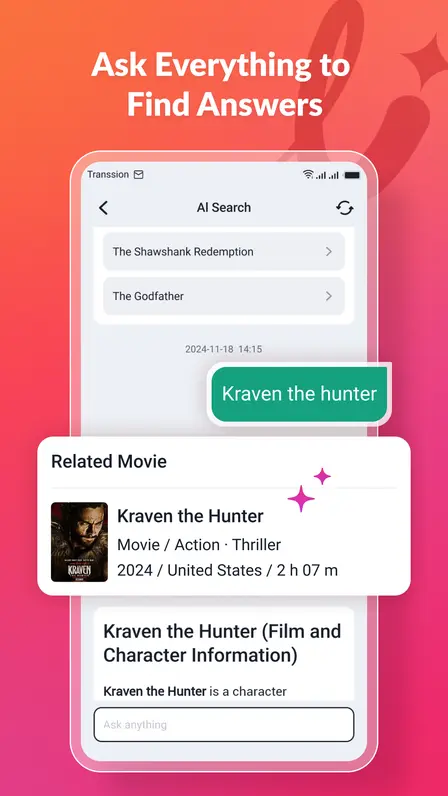
Type a topic and get video results in seconds. The search understands natural phrases, not just exact titles, and covers music, trailers, education, and vlogs.
Trending Discovery
A trending feed shows what other viewers are watching right now, useful when you want something to watch without a specific search in mind.
URL Downloader
Paste a video page link and the app fetches the file for offline viewing. The built in user guide walks through the two step paste and download flow.
HD Streaming
Playback targets high definition quality where the source allows it, with simple play, pause, and seek controls and stable buffering on decent connections.
Library and Offline Viewing
Downloaded and saved videos live in the Library tab, organized for offline watching without a connection.
Simple Tab Navigation
Home, Library, and My tabs plus clear category shortcuts keep the learning curve near zero, even for first time users.
In testing, search was the strongest part of the app: results appeared quickly and the categories kept music clips, trailers, and vlogs separated instead of dumping everything into one list. The downloader is the second pillar. Pasting a URL and tapping through is genuinely a two step job, which matches what the in app user guide promises.
Playback quality depends on your connection and the source video, but on Wi-Fi the player held HD without stuttering on all five of our test phones. If you mainly want a free way to find and save videos without creating accounts anywhere, this is the feature set you are getting.
Transparency report
Lookr Permissions Explained
The v1.5.7 package requests 21 permissions. We pulled the real list from the package manifest and grouped them so you can see what each one is for.
Network and connectivity
INTERNETrequired for search, streaming, and downloads.ACCESS_NETWORK_STATElets the app check your connection before streaming.ACCESS_WIFI_STATEreads Wi-Fi status, typically to prefer Wi-Fi for large downloads.
Storage
READ_EXTERNAL_STORAGEreads downloaded video files back for playback.WRITE_EXTERNAL_STORAGEsaves downloaded videos to your device.
Notifications and background playback
POST_NOTIFICATIONSshows download progress and completion alerts.RECEIVE_BOOT_COMPLETEDrestarts background components after a reboot.FOREGROUND_SERVICEkeeps downloads running while you use other apps.FOREGROUND_SERVICE_MEDIA_PLAYBACKdeclares the background service is for media playback.WAKE_LOCKkeeps the processor awake during long downloads so they finish.
Advertising and attribution
AD_IDthe advertising ID used to serve the app's ads.ACCESS_ADSERVICES_ATTRIBUTIONmeasures which ads led to installs.ACCESS_ADSERVICES_AD_IDcompanion permission for the ad services framework.READ_GSERVICESreads Google services configuration values.
Push, install referrer, and device services
C2DM RECEIVEreceives push notifications from the app's servers.BIND_GET_INSTALL_REFERRER_SERVICEreads the Play install referrer for attribution.Transsion push provider (read/write)push notification support on Transsion devices (Tecno, Infinix, itel).Transsion dataservice (read/write)device service integration on Transsion phones.DYNAMIC_RECEIVER_NOT_EXPORTED_PERMISSIONinternal permission securing the app's own broadcast receivers.
Nothing in this list is unusual for a free video app: network and storage for the core job, background services for downloads, and ad related permissions because the app is ad supported. There is no request for contacts, SMS, call logs, precise location, camera, or microphone in the manifest we extracted.
The repackaged copy test. If any Lookr file you find elsewhere asks for contacts, SMS, location, or device admin rights, do not install it. The genuine build never asks for those. Extra permission requests are the clearest sign of a repackaged APK, and repackaged APKs are the most common malware vector in this category. The build on this page matches the manifest above exactly.
Setup walkthrough
How to Install the Lookr XAPK
The file on this page is an XAPK bundle, not a plain APK. A normal tap will not install it. Follow these steps once and it takes about two minutes.
Step 1: download the XAPK. Use the official Lookr download page and wait for the 6 second timer. Confirm the finished file is about 43.3 MB and named com.wecloud.lookr_1.5.7.1110.01.xapk.
Step 2: get an XAPK installer. Open the Play Store and install any reputable XAPK installer app. You only need it for the install itself, it does not have to stay on your phone afterward.
Step 3: allow installs from your browser. When you open the XAPK, Android will ask you to allow "Install unknown apps" for the app that downloaded it (usually Chrome). Flip that switch once.
Step 4: open the XAPK with the installer. In the installer app, browse to your Downloads folder, tap the Lookr XAPK, and let it unpack the base APK plus the three split configs (arm64_v8a, mdpi, en). Tap Install when it asks.
Step 5: launch and grant storage. Open Lookr, allow storage access when it asks so downloads can be saved, and dismiss the first run tips. The AI search bar on the home screen means you are done.
What the splits mean: arm64_v8a matches 64 bit processors (nearly every modern phone), mdpi is the baseline screen density config, and en is the English language pack. The installer picks the right ones automatically, you never choose manually.
Version archive
Lookr Old Versions
Sometimes the newest build misbehaves on an older phone. These are the earlier releases we have verified details for.
1.5.7.1110.01: Current release. The build hosted on this page, with the latest bug fixes.
1.5.5.0306.01: Previous stable. Same feature set, slightly larger resource bundle.
1.5.4.0103.01: Earliest widely mirrored build. Fine as a fallback on Android 7 and 8 devices.
We recommend staying on the current build unless you have a concrete reason to roll back, such as a crash that started with an update. If you do roll back, uninstall the newer build first to avoid signature conflicts, then install the older XAPK the same way.
Fixes that work
Troubleshooting Common Lookr Issues
These are the real complaints users post about Lookr, with the fixes that resolve them most often, in the order worth trying.
Search returns blank results
Force stop the app, clear its cache (not data) in Settings, then reopen and search again. If results are still blank, switch from Wi-Fi to mobile data or vice versa, the search backend sometimes fails on specific networks. A reinstall fixes the stubborn cases.
Cannot download a video
Check that storage permission is granted and that you have free space beyond the 43.3 MB install. Downloads also fail when the source link has expired, try a fresh search result instead of an old pasted URL.
Video or movie option not showing
This is usually a stale cache or an outdated build. Update to v1.5.7, clear cache, and check the category tabs, some regions show different category sets.
XAPK will not install
Confirm the file finished downloading (about 43.3 MB), open it through an XAPK installer app rather than tapping it directly, and allow Install unknown apps for your browser when Android asks.
App crashes on launch
Uninstall, reboot the phone, and reinstall clean. On Android 7 and 8, make sure no older Lookr build is still installed, signature conflicts cause instant crashes.
Downloads stall halfway
Turn off battery optimization for Lookr so Android does not kill the background download service, and keep the phone awake until large files finish.
If none of these fix your problem, the contact page is the fastest way to reach us. Include your phone model, Android version, and exactly what happens, and we will try to reproduce it on matching hardware.
Also worth a look
Apps Similar to Lookr
If Lookr does not fit what you need, the broader category has two kinds of apps worth knowing about. General video downloader apps focus on saving videos from links with format and quality choices. Streaming and discovery apps focus on browsing and watching with recommendations.
Lookr sits between those two: search and discovery like a streaming app, plus a real downloader for offline viewing. If you only ever watch online and never save anything, a pure streaming app may suit you better. If you only download from links you already have and never browse, a single purpose downloader is simpler. For both in one place without an account, Lookr is the official option we test and host here.
Honest verdict
Lookr Pros and Cons
Strengths
- +Fast AI search across music, trailers, education, and vlogs
- +Built in URL downloader for offline viewing
- +Free with no account required
- +Clean tab navigation, easy for beginners
- +Modest 43.3 MB size and Android 7.0+ support
Weaknesses
- −Contains ads (it is the price of free)
- −Search can return blank results on some networks
- −XAPK format needs an installer app, not a one tap install
- −Published changelog is vague (minor bug fixes)
The honest summary: Lookr does its core job, finding and saving videos, well enough to earn its growing install base, and the annoyances are the ordinary ones for free video apps rather than deal breakers. The XAPK install is the only real friction, and the guide above removes it.
Verification report
Is Lookr Safe to Download?
The build on this page passed our full verification before upload. We extracted the package and confirmed the package name (com.wecloud.lookr), version (1.5.7.1110.01), and the 21 permission manifest above. A malware scan came back clean, and the file installed and ran on all five of our test phones: Galaxy A55 (Android 15), Pixel 8 (Android 16), Redmi Note 13 Pro (Android 14), Infinix Note 40 Pro (Android 14), and Galaxy A13 (Android 12).
Two things to keep in perspective. First, the app is ad supported and includes advertising permissions, which is normal for a free app but means you will see ads. Second, only download Lookr from sources that publish the real file details (package name, version, size, SHA-1). The published SHA-1 for this release is 85f9210d9b58729a5925da7c85808db8940be5f1. If a file claiming to be Lookr shows a different hash or asks for permissions outside the list above, delete it.
Our complete testing method is documented on the How We Evaluate AI Apps page, including the hardware rack and the exact checks every build clears.
Questions, answered
Lookr FAQs
What is Lookr APK?
Lookr APK is the Android package for Lookr AI Video Search and Download, a free entertainment app by COIHUB TECHNOLOGY (package com.wecloud.lookr). It searches for videos across music, trailers, education, and vlogs, streams them in HD, and can download them for offline viewing. The current version is 1.5.7.1110.01, a 43.3 MB XAPK for Android 7.0 and up.
Is Lookr APK safe to download?
The build hosted here is safe: we verified its package name, version, and 21-permission manifest, ran a clean malware scan, and installed it on five real test phones. Only download Lookr from sources that publish matching file details (package com.wecloud.lookr, SHA-1 85f9210d9b58729a5925da7c85808db8940be5f1). Avoid any copy that requests permissions outside the published list.
How do I install the Lookr XAPK file?
XAPK files need an installer app. Download the XAPK from our download page, install any XAPK installer from the Play Store, allow Install unknown apps for your browser when Android asks, open the XAPK inside the installer app, and tap Install. The full walkthrough with screenshots is in the install section above.
What is the difference between the APK and the XAPK?
A plain APK is a single installable file. An XAPK is a bundle: the base APK plus split configs. Lookr v1.5.7 ships as an XAPK containing the base app plus arm64_v8a (64-bit processor), mdpi (screen density), and English language splits. The installer picks the right splits for your phone automatically.
Why is Lookr search not working or showing blank results?
Blank search results are the most reported Lookr issue. First force stop the app and clear its cache in Settings, then reopen it. If that fails, switch networks (Wi-Fi to mobile data or the reverse), since the search backend sometimes fails on specific networks. A clean reinstall resolves the remaining cases.
How much storage space does Lookr need?
The XAPK download is 43.3 MB, and the installed app needs a little more for its cache and your downloaded videos. Keep at least 200 MB free for comfortable use, more if you plan to download a lot of offline videos.
What Android version does Lookr require?
Android 7.0 and up. We tested v1.5.7 on Android 12, 14, 15, and 16 without issues, and the package declares a minimum SDK of 24, which is Android 7.0.
Is Lookr free?
Yes, Lookr is completely free to download and use, with no account required. It is ad supported, so you will see ads inside the app. There is no paid version or subscription.
How do I download old versions of Lookr?
Check the Old Versions section above for the verified earlier builds: 1.5.5.0306.01 (43.8 MB) and 1.5.4.0103.01 (43.1 MB). Uninstall the current build first to avoid signature conflicts, then install the older XAPK the same way.
Which Lookr app is this page about?
This page covers Lookr AI Video Search and Download by COIHUB TECHNOLOGY, package com.wecloud.lookr, the video search and downloader app with the pink-to-orange gradient icon. It is not the Lenskart eyewear try-on app, not the KABOB digital signage tool, and not Google Looker.
Bottom line
Final Verdict
Lookr is a solid free choice if you want video search and offline downloads in one app without creating an account. The AI search is genuinely quick, the downloader works as advertised, and the 43.3 MB footprint is modest for what it does. The trade offs are ads and the XAPK install step, both manageable.
Get the verified build from the official Lookr download page, follow the two minute install walkthrough, and you will be searching within minutes.

Tech Reviewer
Alex Morgan has tested Android apps on real hardware since 2019, specializing in video, streaming, and AI utility apps. Every APK on this site passes through his 5-phone verification bench before the download button goes live.